
Unapproved AI use often starts with a legitimate work problem: summarizing a document, preparing a draft or finding information. A policy needs to explain permitted behavior, but an adoption program also needs a workable alternative and an accessible route for exceptions.
Learn where demand comes from
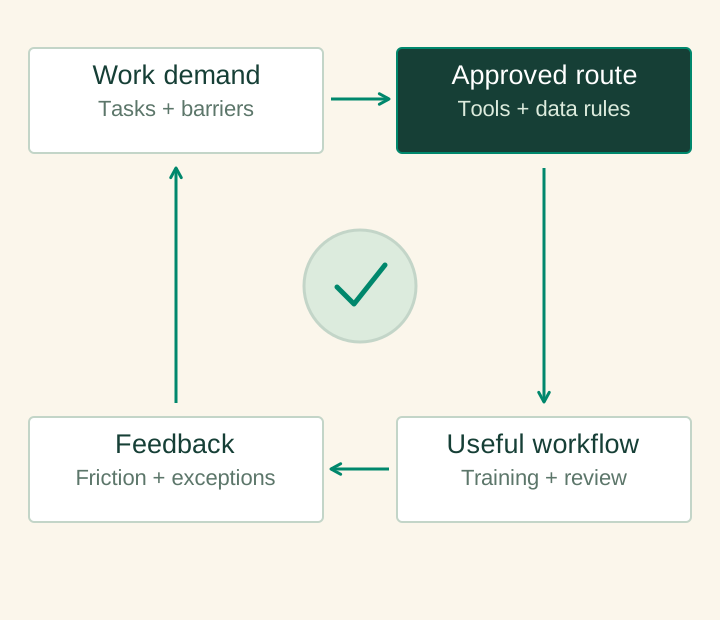
Ask teams which tasks they use AI for and what prevents use of the approved tools. Combine that feedback with proportionate, authorized software and access reviews. Be clear about the purpose and limits of discovery. Treat the findings as a workflow-design input rather than assuming every use has the same risk.
Define a practical permission model
Create short rules tied to recognizable data categories and tasks. Explain where public information, internal material and restricted data may be used. Provide a named route for questions and exceptions. The policy should be easy to apply in the moment; an employee should not need to interpret a general risk framework before drafting a routine document.
Support the approved workflow
Configure access, publish useful starting workflows and train teams on verification and escalation. Identify source material that should be maintained centrally. Make managers responsible for setting expectations about review, not merely encouraging usage. A tool rollout without relevant workflows can leave the original demand unresolved.
Turn the policy into recognizable work scenarios
Show employees how the rules apply to a public document, an internal planning note and a restricted customer record. Specify the approved route, the required review and where to ask when the classification is unclear. Use scenarios from the actual function rather than a generic awareness presentation.
Collect feedback after the first rollout. If users repeatedly need to paste the same material into a tool, a maintained source connection may be more useful than another training session. If the approved workflow produces unhelpful drafts, inspect the task and review process. Improving the legitimate route is part of control effectiveness.
Review friction as well as usage
Track where staff abandon the approved route, repeat manual work or request exceptions. Use those patterns to improve training, permissions or the workflow itself. Review incidents and material product changes with the relevant owners. Adoption is successful when useful work moves through a controlled process, not simply when account activation rises.
Before the next decision
Planning checklist
- Task inventory and proportionate discovery approach
- Clear data and permitted-use rules
- Approved tools, training and exception route
- Feedback loop for unresolved workflow friction
Sources and further reading
Sources checked 5 October 2026. The design recommendations in this guide are AID’s analysis. Sector obligations depend on the use case and jurisdiction.
Apply this to a defined workflow
AID’s enablement work can combine Claude access, practical workflows, user training and operating ownership.